Step 3: Making the player move forwards
Now we want to make the player move forwards in the direction it's facing. To set up the forwards movement, grab the same blocks we used for left and right rotation. Get the "When the player presses key up arrow" and "When the player releases key up arrow" blocks, as well as a property variable "set true/false forwards to true". Make sure that variable is set to true when the up key is pressed, and false when the up key is released.

And then in the Constantly block we'll check if forwards is true, and if it is, give the player velocity, else if forwards is false, give it no velocity. To get it moving we'll give it a velocity of 200.
Grab the "if" block (from Control Flow), two "_=_" blocks, (from Operators), the "true" block and the "false" block (from Operators), and two "set velocity x" blocks (from Physics). Once you've dragged those blocks out into the Constantly block, click on the cog icon on the "if" block and drag the "else if" block inside the "if" block. This will make the "if" block into an "if, else if" block, which allows you to specify alternative things that should happen if the condition is different.
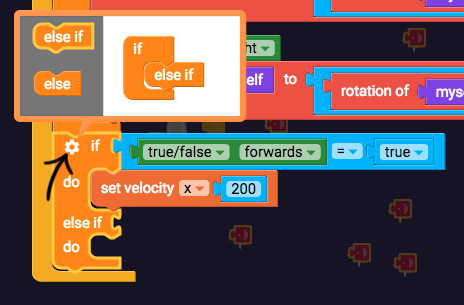
Set velocity x to 200 if forwards = true, and then in the "else if" section, check if forwards = false, and set velocity x to 0.

Now let's test it out.

Nope, that doesn't look right! How about 200 y velocity as well?


That isn't working either. We need a way to get the x velocity and y velocity to change based on the rotation of the player.