Step 4 - Nested Loops
A loop inside a loop is known as a ‘nested loop’.
Sometimes we’ll need to tell our chicken to repeat loops as well as actions. Repeating loops that are themselves made up of repeating actions can save us a lot of coding. It’s sounds confusing but it should all make sense by the end of this step.
> Open Level 4.
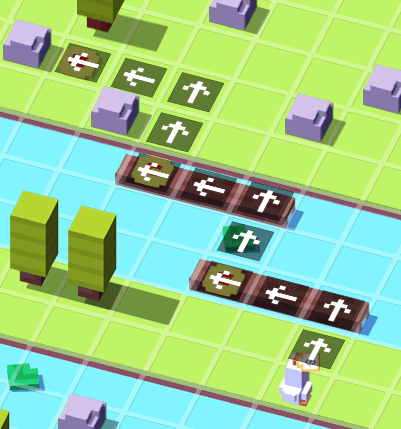
Let’s use nested loops here to send our chicken to all the coins with the fewest number of instructions.
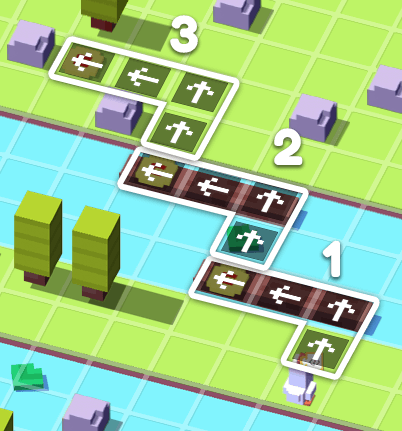
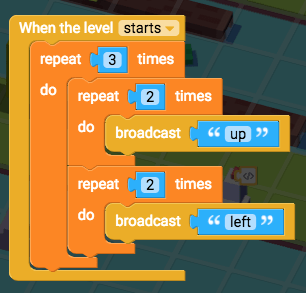
> Think about the most efficient movements the chicken can make to get to the coin. It looks like the chicken needs to move up twice, and then move left twice. And then it repeats that set of movements two more times by going up twice again, left twice again, and then once more it goes up twice again, and left twice again.
> Edit the script on the chicken, and grab "When the level starts", "broadcast message", and "repeat 10 times". Change "10" to “2”, and “message” to “up”.
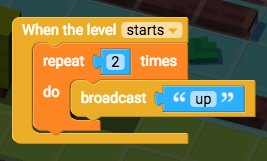
> Duplicate the repeat block by right-clicking on it, and then drag it under the first repeat block. Change the duplicate "up" to “left”.
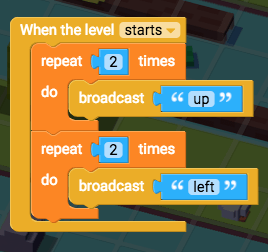
Now we need to repeat these repeats.
> Grab a new "repeat 10 times" block, and it above the first two repeat blocks. Then drag the other two repeat blocks inside the top repeat block to create a nested loop. Change “10” to “3”.
> Click Play once you're confident that you've solved the level.
Did the chicken get all the coins? Great! Let’s continue to the next step.
If not, have a look back over your Script and see if you can spot the bugs.