Step 7 - The Forever Loop
What if we want our chicken to just keep doing something indefinitely? We use a ‘forever loop’.
> Open Level 7.
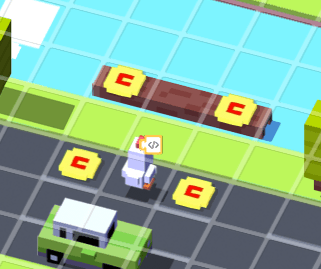
> Edit the script on the chicken and try to solve this level using the blocks from the previous steps, which are:
"When the level starts" (from Events)
"Repeat 10 times" (from Control Flow)
"Broadcast message" (from Events)
And use "left", “right”, “up”, or “down” instead of “message” in the broadcast blocks
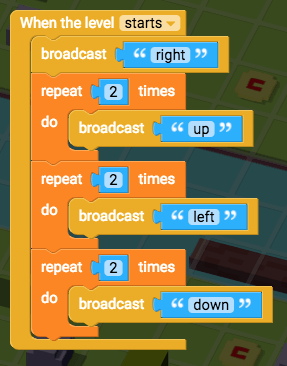
> Play the game to see if you’ve solved the level.
But wait! The coins keep reappearing! Are they going to keep turning up forever? Yup. So let’s use a forever loop to keep our chicken collecting those coins.
> Close the game preview and edit the script.
> Open Control Flow and drag "forever" into the "When the level starts" block.
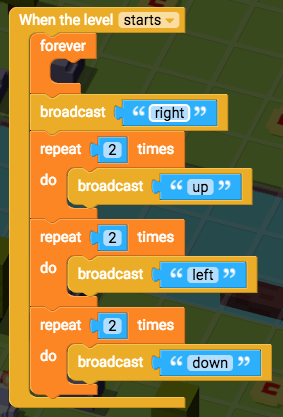
> Drag your broadcast blocks into the "forever" block so that the movements will repeat forever!
> You will need to add "broadcast right" to the end so that the chicken keeps moving along the same path.
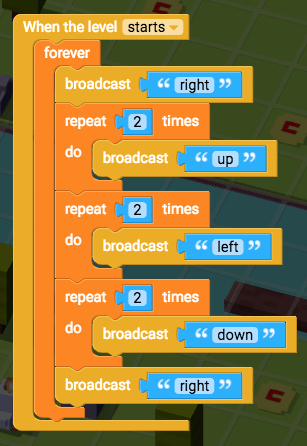
Play the game to see if the forever loop makes the chicken keep collecting these coins.
After a while the game will figure out the chicken will keep collecting all the coins forever, so it will show you the win screen. Did that happen? Great! Let’s continue to the next step.
If not, have a look back over your Script and see if you can spot any bugs.