Step 3 - Coding inputs/outputs
Your squid didn't get very far, let's fix that.
Your squid will need to swim around to explore its environment. Colossal squid can swim forward using their muscular tail fin or move backwards using jet propulsion by rapidly shooting water out through a funnel near their head.
Let's create a script for the movement controls of your colossal squid.
Click Close to stop playing the game.

Then click the X to close the Start button's script.

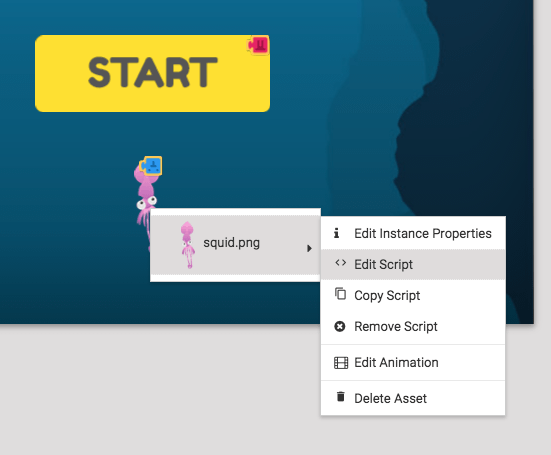
Right-click on the squid and select Edit Script.
First we'll make the squid move when you press the up arrow on your keyboard. Open Events and drag "When backspace/delete pressed" into the work space.
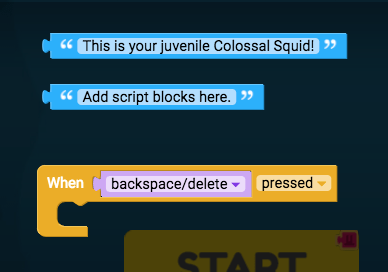
Click on "backspace/delete" and change it to "up arrow".

Then we'll make the up arrow broadcast the message "move". Open Events and drag "broadcast message" into "When up arrow pressed".

Click on "message" and type in "move".
You can click Play to see your squid move when you press the up arrow. But the squid can't travel to the left or right. Press Close so we can return to the script and we'll add this code.
We'll make it so the squid turns to the left when the left arrow is pressed, and turns to the right when the right arrow is pressed. Open Events and drag "when backspace/delete is pressed" into the work space under the first block. Change this one to "left arrow".
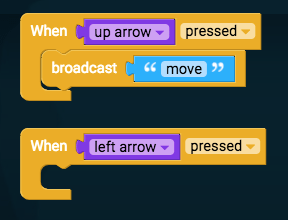
Then find another "broadcast message" block and drag it inside "When left arrow pressed". Change "message" to "turn left".

Now grab these same blocks again to add "When right arrow pressed, broadcast turn right".

Nice one! Now when you play the game you'll be able to move the squid to wherever it needs to go.