Step 7 - The human factor
Let's give your squid a competitive edge.
We don't know how good squid are at counting so we're going to give it some help. In fact there's more we don't understand about colossal squid than things we do know. For instance, why do they have dark ink when they already live in darkness? How clever are colossal squid with their donut shaped brains? How big can they really grow?
Let's create a script to help your colossal squid count. We can create a score system to keep track of how many prey the squid has eaten.
To make this work, open your prey scripts and make it so that they broadcast the message "score" just before they are destroyed.

Make sure each different prey has their script updated with these blocks.
Now you'll need to add a few blocks to your squid's script to get this working, so find the squid and edit its script.
Creating the score
First we'll set up the score system by creating a score variable and textfield. Here are the blocks you will need:
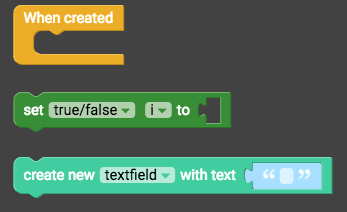
- "When created" (from Events)
- "Set true/false i to" (from Variables)
- "create new textfield with text" (from Draw)
Snap the blocks together, and then change "true/false" to "number", and change "i" to "score". Also drag a "0" (from Operators) into the "set number score" block.
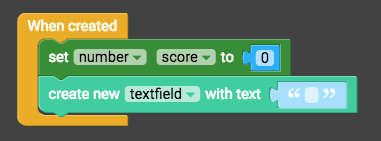
Then grab these blocks:

- "Create text with" (from Operators)
- "Number score" (from Variables)
- "Set font colour of instance textfield to red" (from Draw)
Snap these blocks together with the previous blocks like this:
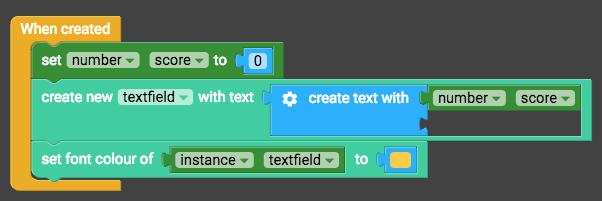
Don't forget to change red to yellow because yellow is a superior colour.
Positioning the textfield
The score's textfield needs to constantly follow the camera so that we can see it. Add these blocks:

- "Constantly" (from Events)
- "Set x position of myself to 0" (from Transform)
- "Instance textfield" (from Variables)
- "Camera x" (from Looks)
Snap these blocks together like this:
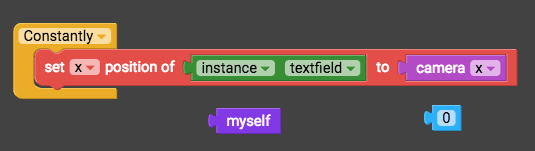
You can delete "myself" and "0". Then duplicate the "set x position" block by right-clicking on it and selecting duplicate. Change the Xs to Ys in the duplicate blocks.

Increasing the score
Lastly we will make the score update when your prey broadcast "score". Grab these blocks:
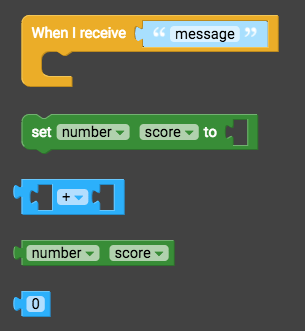
- "When I receive message" (from Events)
- "Set number score to" (from Variables)
- "+" (from Operators)
- "Number score" (from Variables)
- "0" (from Operators)
Snap the blocks together like this:
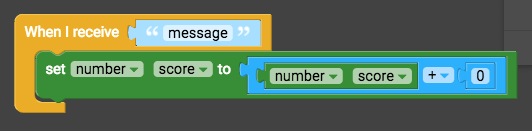
Change "message" to "score", and change "0" to "1".

Then add these blocks:

- "Set text of instance textfield to" (from Draw)
- "Create text with" (from Operators)
- "Number score" (from Variables)
Add them to the above blocks like this:
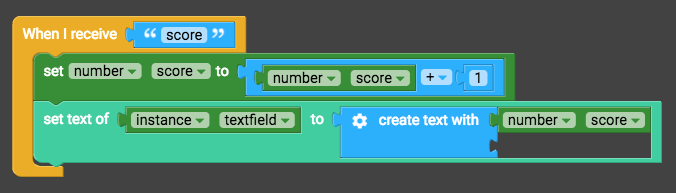
Here's how your finished squid script will look:
